FREE · MT4 + MT5 INDICATOR

The Kill Zone Clock

Your sessions, kill zones and key levels drawn on the chart in UK time, with a live clock that tells you what's open now and what's next. It gets the clock changes right, every week of the year.

MetaTrader 4MetaTrader 5Forex, gold & indicesSets itself up

The download opens straight away. No spam. See our privacy policy.

On your phone? Sign up anyway. MetaTrader indicators install on a computer, so we'll email you the download link to open there later.

FREE
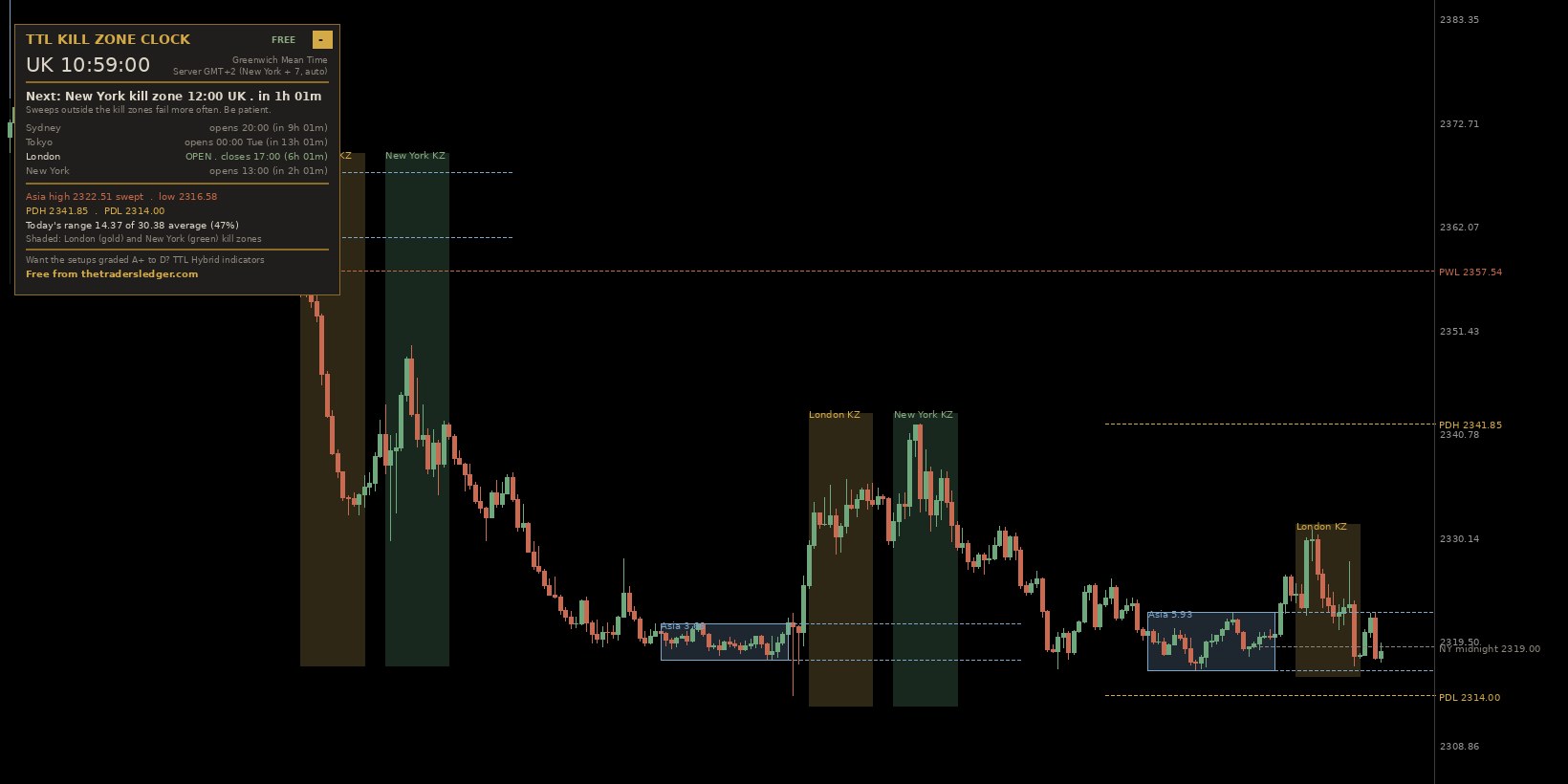
TTL Kill Zone Clock on a gold M15 chart: Asian range boxes, London and New York kill zones, previous day high and low, and the live UK session clock panel

Gold, M15. Asian range boxes in blue, London kill zone in gold, New York in green, yesterday's and last week's levels on the right, and the clock panel top left.

Why traders keep it on every chart

1

It knows when to look

Most liquidity sweeps that work happen inside the London and New York kill zones. The panel tells you which one is live and how long is left, so you're not staring at the chart all day.

2

It marks the liquidity

The Asian high and low and yesterday's high and low are where the stops sit. It draws them, then tells you the moment one gets run, with a reminder of what a sweep looks like versus a breakout.

3

It gets UK time right

It reads your broker's server clock and follows the UK, US and Australian clock changes on their own dates. No fiddling with offsets twice a year, and no boxes an hour out in the gap weeks.

Kill zone times in UK time

WindowMost of the yearClock-change gap weeks
Asian range00:00 – 06:0000:00 – 06:00
London kill zone07:00 – 10:0007:00 – 10:00
New York kill zone12:00 – 15:0011:00 – 14:00

The gap weeks are the weeks in March and in late October/early November when the UK and the US change their clocks on different weekends. The indicator switches over by itself. Want to see it live in your browser? Try the market hours clock.

Questions

Is the Kill Zone Clock really free?

Yes. Pop your name and email in and the MT4 and MT5 files download straight away. No licence key, no trial, no time limit.

Does it work with my broker's server time?

Yes. It reads your broker's server clock and works out the offset itself, so the boxes land on the right UK times on any broker. If you ever need to, you can set the server time by hand in the settings.

What happens when the clocks change?

It follows the UK, US and Australian clock changes on their own dates. That matters in the gap weeks in March and October/November, when the UK and US change on different weekends and the New York session opens an hour earlier for us. Most session indicators get those weeks wrong.

What are the London and New York kill zones in UK time?

London is 07:00 to 10:00 UK time. New York is 07:00 to 10:00 New York time, which is 12:00 to 15:00 UK time for most of the year and 11:00 to 14:00 in the gap weeks.

Which timeframes and markets does it suit?

Any symbol: forex pairs, gold, silver and indices. The boxes and bands read best on M5 to H1, where you'd normally look for the sweep.

MT4 or MT5?

Both. You get a file for each, so use whichever platform your broker gives you.

Learn the setups it's built for

How to use a kill zone indicator  ·  The Asian range strategy  ·  Previous day high and low  ·  When the clocks change  ·  How to trade a liquidity sweep

Put it on your chart today

Free for MT4 and MT5. Pop your name and email in and the download opens straight away. You'll also get the free Liquidity Sweep Playbook by email.

Get the Kill Zone Clock

An analysis tool only, not financial advice or a signal service. Trading carries a high level of risk.

← The Trader's Ledger