A free kill zone indicator for MT4 and MT5, in UK time
A kill zone indicator does one simple job: it shows you, on the chart, the short windows when the best intraday moves tend to happen. For a UK trader that means the London kill zone (07:00 to 10:00) and the New York kill zone (12:00 to 15:00 most of the year), plus the Asian range that London so often runs. Simple, but most free versions get it wrong for weeks at a time. Here’s what to look for, and how to use the free one I built.
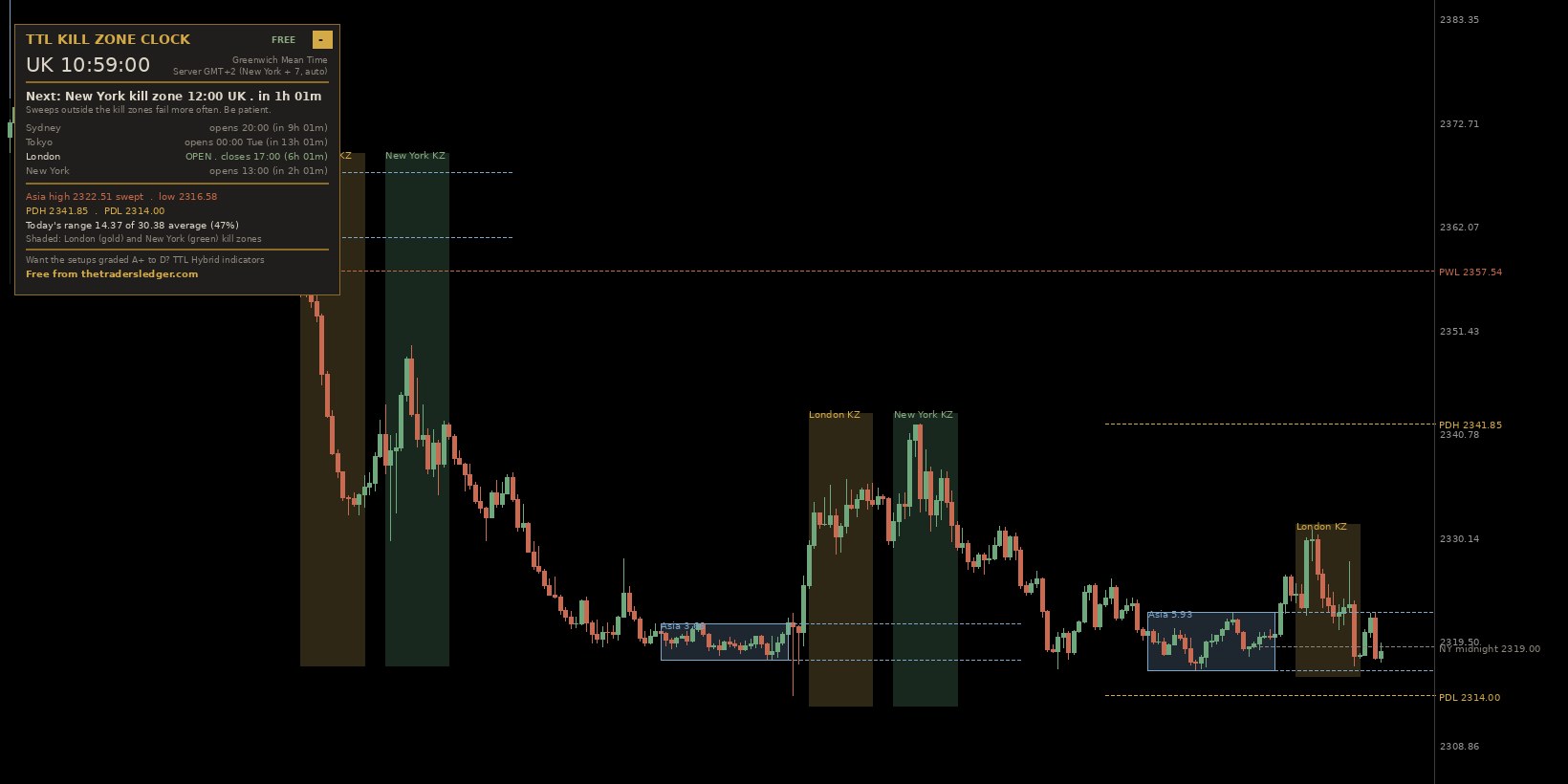
What a kill zone indicator should show
- The Asian range (00:00 to 06:00 UK), boxed, with its high and low carried forward. That’s the liquidity London likes to take.
- The London and New York kill zones shaded on every day, so you can scroll back and see how price behaved in them.
- Yesterday’s high and low, and ideally last week’s too. These are the next pools of stops beyond the Asian range.
- The time, in your time. Your broker’s chart runs on its server clock, usually two or three hours ahead of the UK. An indicator that makes you do that maths is one you’ll stop using.
- Alerts, so you don’t have to sit and stare: when a kill zone opens, and when one of those levels gets run.
Why most kill zone indicators are wrong twice a year
The New York kill zone is set by New York’s clock, not London’s. The UK and the US change their clocks on different weekends, so for two or three weeks in March and about a week around the start of November, New York is only four hours behind us instead of five. In those gap weeks the New York kill zone runs 11:00 to 14:00 UK and US data lands at 12:30.
Most indicators use a fixed offset from the server clock, so their New York box sits an hour late through every gap week. Some also get the server offset itself wrong when the broker changes its clocks. The TTL Kill Zone Clock works the times out from each city’s own calendar (UK, US and Australia) and reads your broker’s offset from the platform, so the boxes stay put all year.
Setting it up (about a minute)
- Get the free download from the Kill Zone Clock page. There’s a file for MT5 and one for MT4.
- In MetaTrader, click File → Open Data Folder, open MQL5 (or MQL4) → Indicators and drop the file in.
- Right-click Indicators in the Navigator and click Refresh, then drag TTL_Kill_Zone_Clock onto a chart.
- Click OK. It works out your broker’s server time by itself. If the boxes ever look an hour out (it can happen if you load it at the weekend on an unusual broker), set Broker server clock to 1, which suits most brokers.
It reads best on M5 to H1, on forex pairs, gold, silver or indices.
How to use it in a trading day
Before London (06:00 to 07:00 UK). Look at the Asian box. The panel shows its size in pips. A tight range is fuel: the stops above and below it are close together and London often runs one side.
In the London kill zone (07:00 to 10:00). Wait for price to run the Asian high or low. You’ll get an alert the first time it does. Then read the close: a close back inside the range is the liquidity sweep; a close beyond it that holds is a breakout. Don’t guess which before the candle closes. More detail in the Asian range strategy.
Between the kill zones. The panel’s headline shows the countdown to New York. Sweeps outside the kill zones fail more often, so this is the time to log your morning, not to force a trade.
In the New York kill zone. US data lands inside it. London’s high and low, and yesterday’s high and low, become the levels to watch.
The settings worth knowing
| Setting | What it does |
|---|---|
| Broker server clock | 0 = auto (default). 1 = New York + 7, which most brokers use. 2 = GMT+2/+3 with UK/EU clock changes. 3 = a fixed offset you type in. |
| Days to draw | How many days of boxes and kill zones to show (10 by default). |
| Show … | Switch the Asian box, either kill zone, the previous day or week levels or the midnight open line on and off. |
| Alert minutes before | Get the kill zone alert early, for example 5 minutes before London opens. |
| Push notification | Send the alerts to the MetaTrader app on your phone (add your MetaQuotes ID under Tools → Options → Notifications). |
Put the kill zones on your own chart, free
The TTL Kill Zone Clock draws the Asian range, the London and New York kill zones in UK time, yesterday’s and last week’s highs and lows, with a live UK session clock and sweep alerts. Free for MT4 and MT5, and it handles the clock changes by itself.
Download the Kill Zone Clock freeWhen you start taking the sweeps, log them in The Trader’s Ledger: it marks whether each trade was inside a kill zone, so after 30 or 40 trades you can see in your own numbers whether the timing really matters for you.
Frequently asked questions
Is there a free kill zone indicator for MT5?
Yes. The TTL Kill Zone Clock is free for MT5 and MT4. It draws the Asian range and the London and New York kill zones in UK time, with yesterday’s high and low, a live session clock and alerts. Download it from thetradersledger.com/free/kill-zone-clock/.
What are the ICT kill zones in UK time?
London: 07:00 to 10:00 UK. New York: 07:00 to 10:00 New York time, which is 12:00 to 15:00 UK most of the year and 11:00 to 14:00 in the clock-change gap weeks. The Asian range is usually taken as 00:00 to 06:00 UK.
Why are my kill zone boxes an hour out?
Usually because the indicator uses a fixed offset from the broker’s server clock, so it goes wrong when the UK, US or the broker changes clocks. Use an indicator that follows each city’s own clock changes, or check its server-time setting.
Which timeframe is best for kill zones?
M5 to H1 for seeing the kill zones and the sweep. Many traders mark the levels on H1 and time the entry on M5 or M15.
Educational content only, not financial advice. Trading carries a high level of risk and you can lose more than you expect. Examples use illustrative prices.